THIS RELEASE INTRODUCES IMPROVEMENTS TO BENEFICIARY MANAGEMENT, SELF-ENROLLMENT WORKFLOWS, CLAIMS HANDLING, AND ADMINISTRATIVE TOOLS, ALONG WITH SEVERAL ENHANCEMENTS TO IMPROVE OPERATIONAL EFFICIENCY.
Release Notes – Version 2.40.0
NEW FEATURES
Automated Management of Administration Fees
A new automated process has been introduced for the calculation and management of administration fees.
The platform can now automatically generate administration fees based on the configuration defined for each plan and each benefit.
⚠️ To activate this new feature, a request must be submitted to Segic.
Two Calculation Methods Available
Management fees can be calculated as a percentage :
On the premium before taxes
On the premium including all taxes
⚠️ This setting is global and applies to all plans.
Two Display Modes for Management Fees
The total management fees and applicable taxes can be configured using two display modes:
Separate Display
Displayed on a separate and clearly identified line
Visible on billing and associated documents
Integrated Into Premiums
Management fees and taxes are added to the premium and taxes of the related benefit
⚠️ This setting is also global and applies to all plans.
Plan-Level Configuration
When management fee calculation is enabled for a plan:
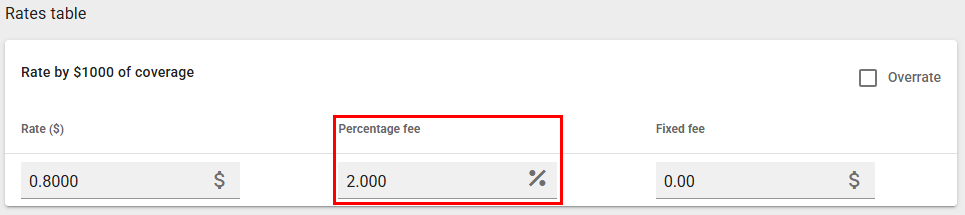
It is possible to configure, at the benefit rate table level:
A percentage-based fee
A fixed dollar amount
A combination of both
Examples:
Life Insurance Benefit: application of a specific percentage (%)
Health Benefit: fixed dollar amount per coverage
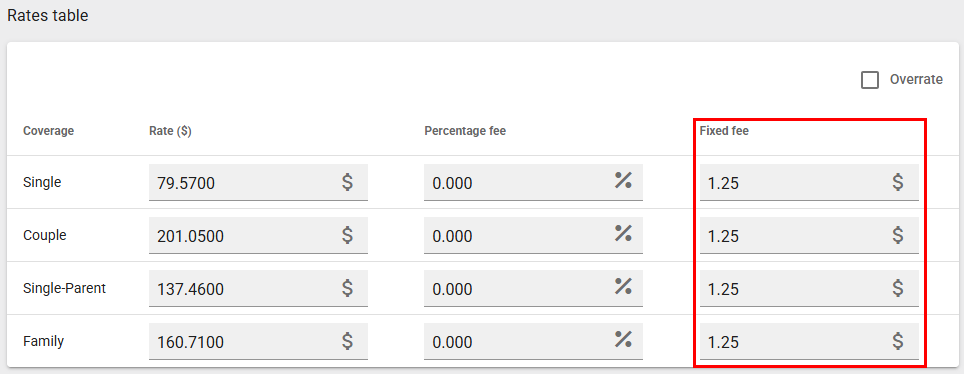
It is therefore possible to:
Apply different fees depending on the coverage
Not apply fees to certain coverages
Tax Application
The sales tax rate applicable according to the province will automatically be applied to the calculated management fees.
This logic respects the current provincial tax regulations.
Management Fee Billing
A new document is generated for each plan, accessible in the “Carrier Invoices” section.
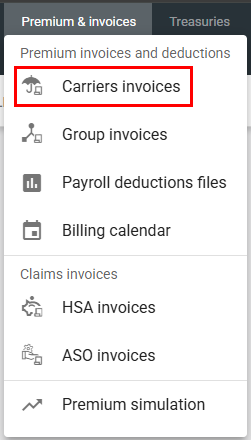
This document:
Details the management fees
Indicates the applicable taxes
Presents the information by benefits
Allows for clear remittance of amounts to the receiving administrator
New Features – Segic Administrative Platform
Client Portal Access Management
A new menu option is now available to enable complete management of access to the Client Portal.
From the “Client Portal” menu, a new option titled “User Access” now allows you to:
Create a new user access
Modify an existing user access
Terminate an existing user access
Important :
This feature is accessible only to users who have the “Administrator” role on the Segic platform.
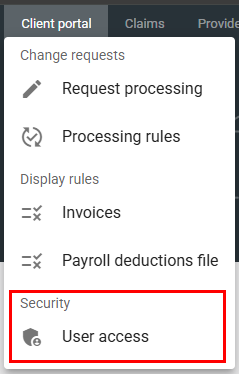
Security Access Roles
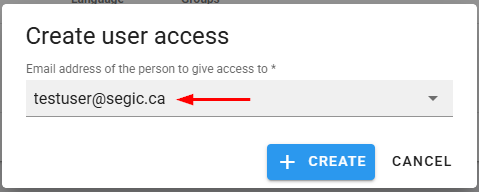
1. When creating a new user access, you must first enter a valid e-mail address.
At least one group must be selected. (You can attach multiple groups to a single user)
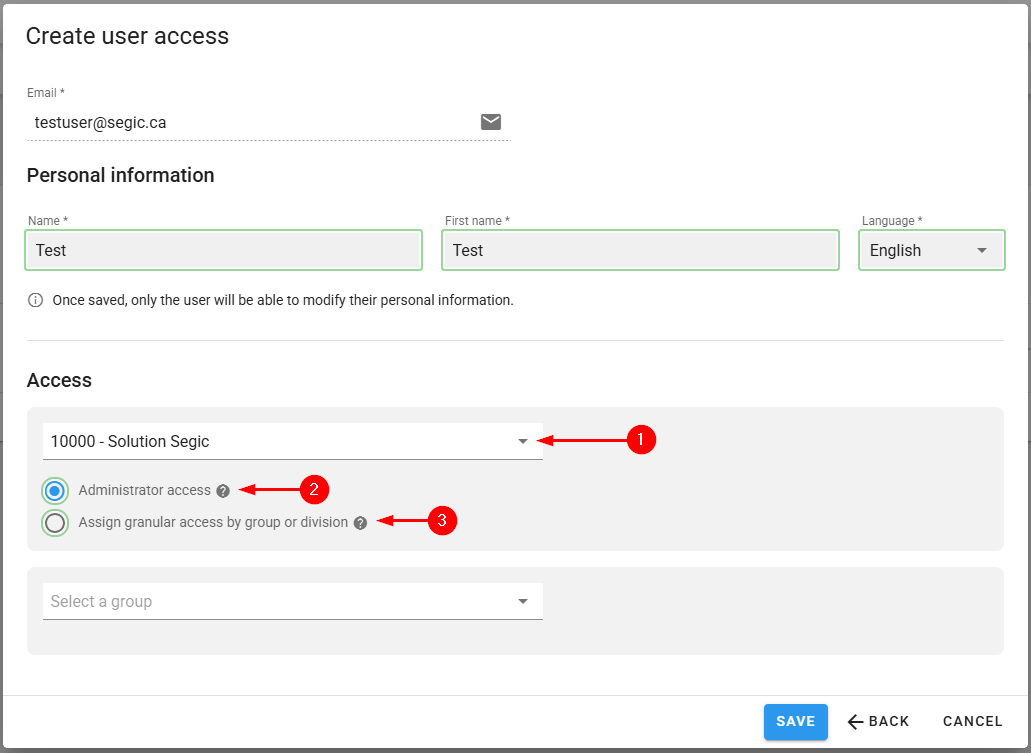
Two types of access roles are available:
2. Administrator Access
This type of access provides full control with modification rights over the entire group, including:
- All divisions
- All plan members
- All payroll deduction files
- All Invoices
- Premium simulations
- All change requests
3. Granular Access (by Group or by Division)
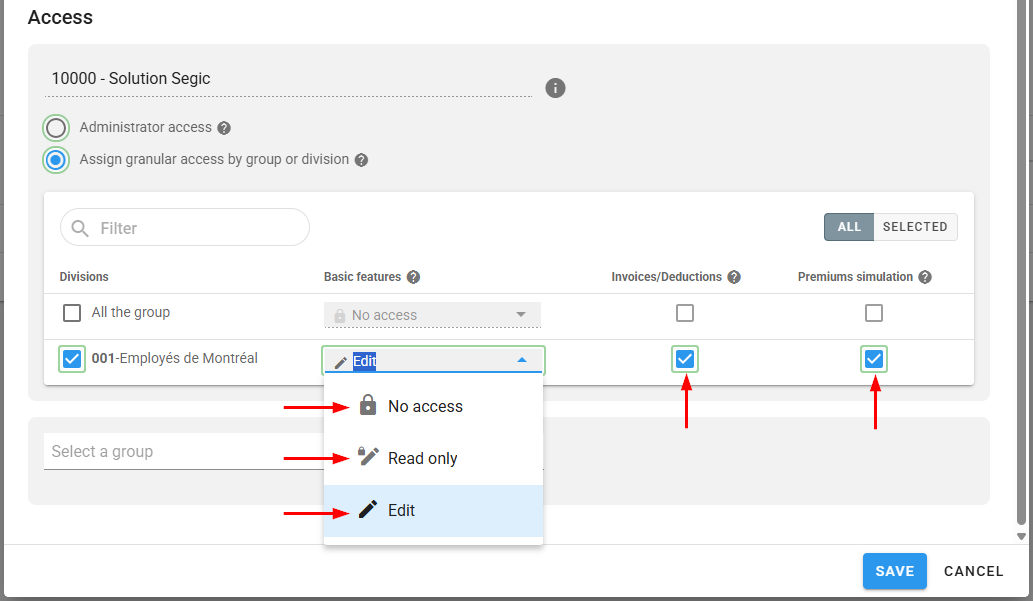
This option allows you to precisely define which functionalities are accessible to the user, either for the entire group or by division.
Division-Level Access Management
It is possible to assign different permissions for one or multiple divisions.
For each division, you can select one of the following levels:
No access: The user cannot view the division.
Read-only: The user can view the information but cannot modify it.
Edit: The user can submit change requests.
In addition, for each division you can specify whether the user has access to:
Invoices & Payroll Deduction files
Premium Simulations
Basic Parameters – Banking Information During Self-Enrollment

A new behavior has been introduced for the setting “Withdraw premiums from the plan member bank account”
When this setting is enabled, plan members must provide banking information during self-enrollment.
When the setting is disabled, banking information remains optional..
This ensures that the enrollment process aligns with the premium payment configuration of the plan.
Automated Processing of New Plan Member Requests
Requests submitted through the Client Portal to add new plan members can now be processed automatically.
When the rule is configured as Automatic, the new plan member will be automatically created without human validation.
This automation reduces manual processing and speeds up plan members onboarding.
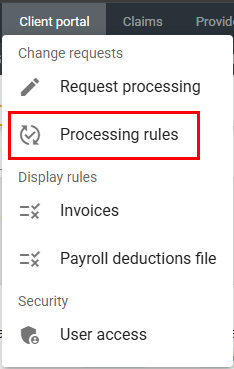
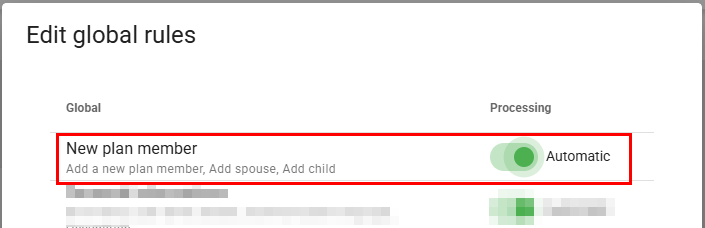
When the processing rule for plan member addition requests is configured as “Automatic,” the processing is simplified.
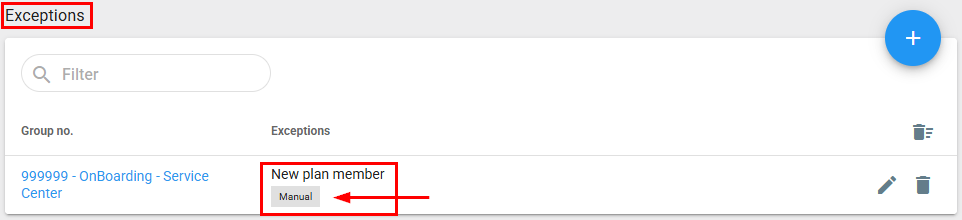
You can set an exception for one or multiple plans to “hold” the automatic creation.
When processing a request to add a plan member manually, simply click the “Lightning” button and the system will automatically create the plan member.

This feature speeds up the processing.
New Plan Member – Adding Dependents
When creating a new plan member through the Client Portal, dependents can now be added within the same request.
A new step has been added to the plan member creation process to allow administrators to enter dependent information at the time of submission.
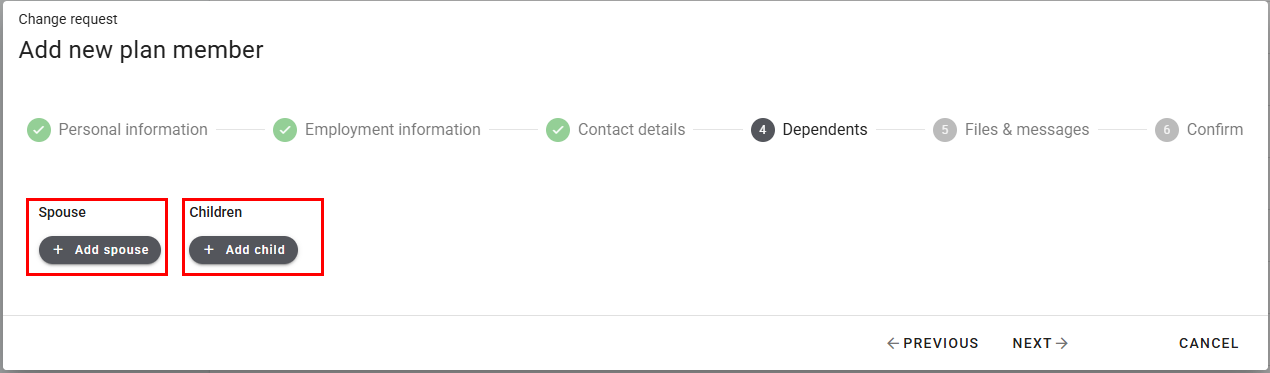
This eliminates the need to submit a separate request afterward to add dependents.
Request Processing – Filter by Request Type
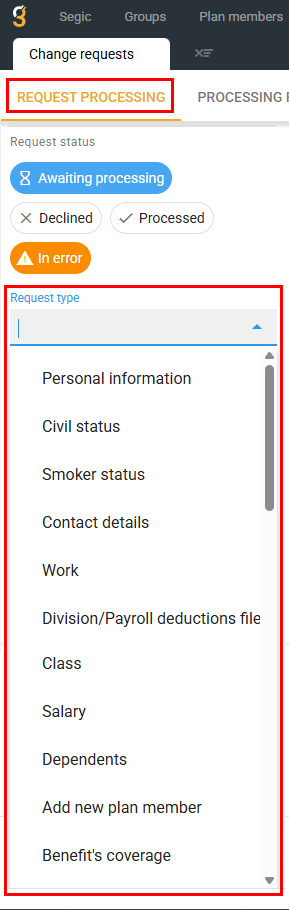
A new “Request Type” filter has been added to the request processing screen.
Administrators can now filter requests by category, including:
Personal information
Marital status
Smoking status
Contact information
Employment information
Division / Payroll deduction file
Class
Salary
Dependent information
New plan member creation
Benefit coverage
This improvement allows administrators to quickly locate and process specific types of requests.
New Features – Claims Administration
Attach Documents to Manual Claims
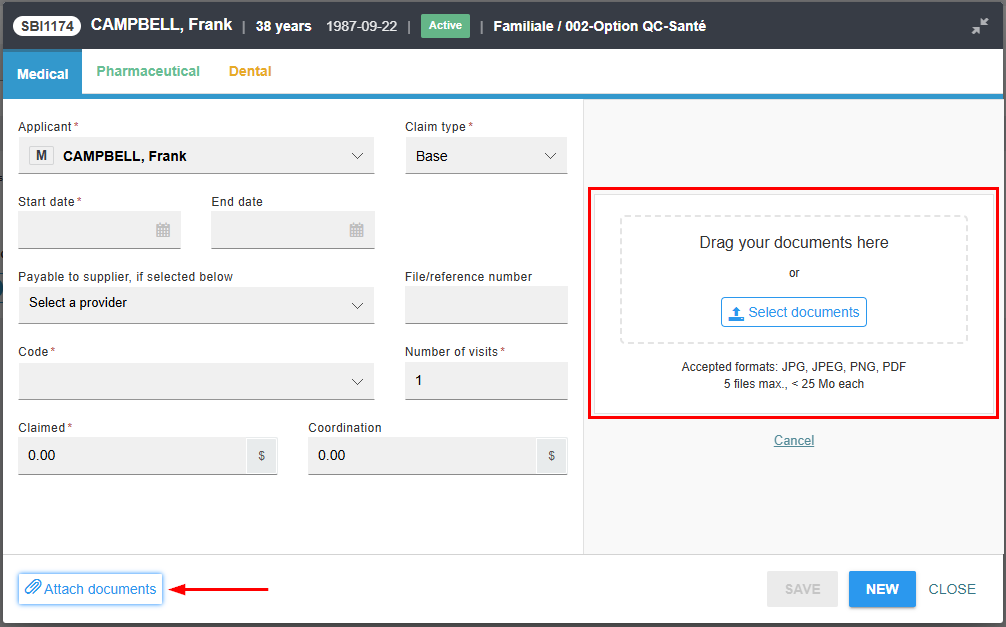
It is now possible to attach supporting documents to manually created claims.
Documents received by email or mail can be uploaded directly to the claim record.
All attached documents:
remain linked to the claim
can be accessed from the claim screen
are automatically stored in the plan member’s document vault
This improvement centralizes claim documentation and improves record management.
Claims Insurance Plans – Automatic Link
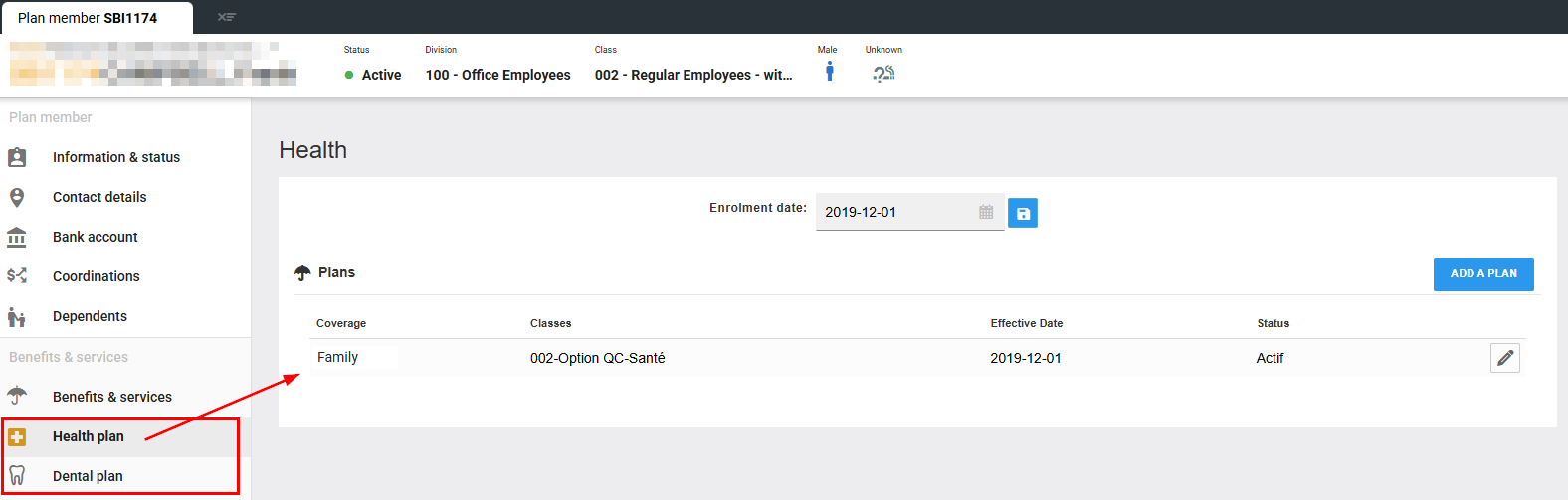
Claims insurance plans are now automatically added to the plan member’s profile upon completion of their self-enrollment.
This enhancement ensures that the selected coverages are immediately associated with the plan member’s record, without any additional manual intervention.
Improvements
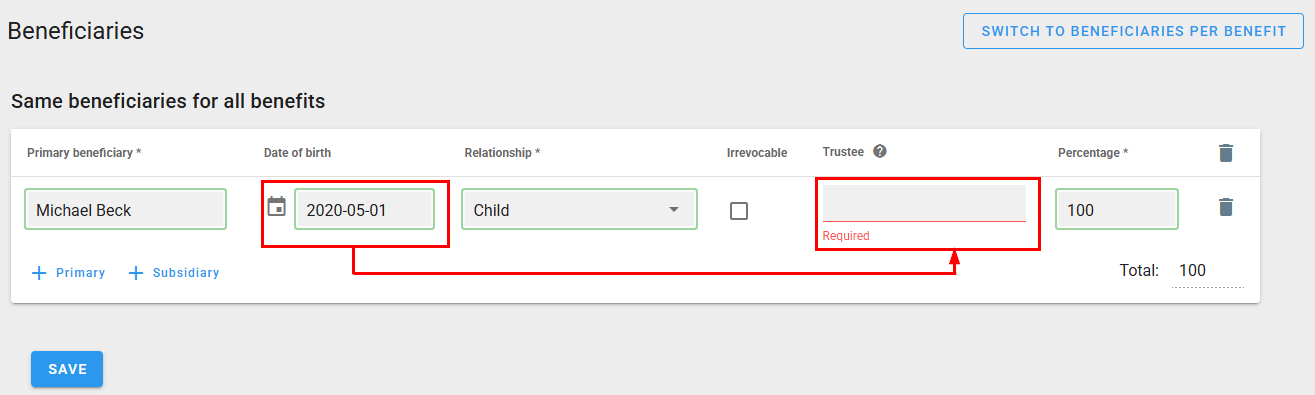
Mandatory Trustee for Minor Beneficiaries (Outside Quebec)
When designating a minor beneficiary whose province of residence is outside Quebec, the system now requires a trustee to be specified during beneficiary designation.
This rule applies within both:
The Segic administrative platform
The self-enrollment process
This ensures compliance with regulations governing benefit payments to minor beneficiaries outside Quebec.
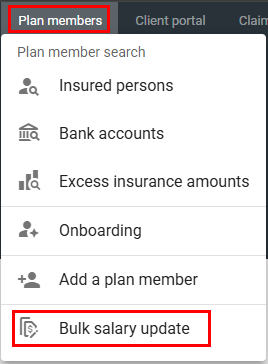
Mass Salary Update – Pre-Filled Template
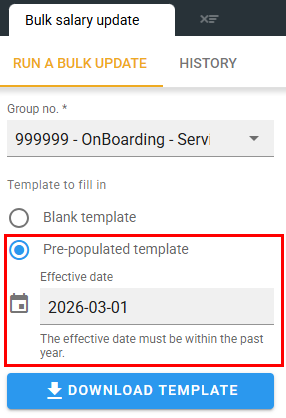
A new pre-filled Excel template is now available for mass salary updates.
The template automatically includes all participants active on a selected effective date, reducing manual data entry and minimizing errors.
The template includes:
First name
Last name
Status
Class
Division
Current salary
Users only need to complete:
New salary
Effective date
Multiple salary updates with different effective dates can be included within the same file.

Insured Capital Rounding
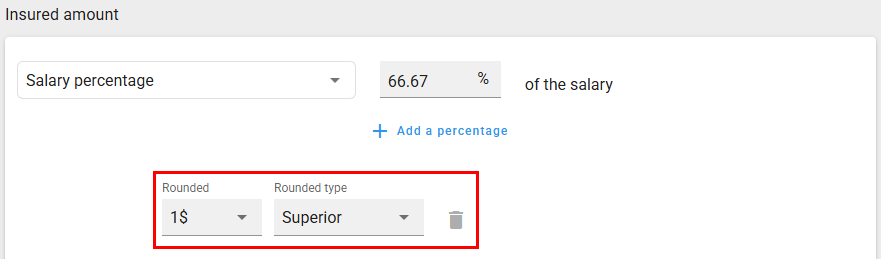
The rounding rule for insured capital in the following benefits has been enhanced:
Short-Term Disability (STD)
Long-Term Disability (LTD)
Rounding is now optional.
If no rule is configured, insured capital will automatically be rounded to two decimal places.
If required, a different rounding rule can be configured in the benefit settings.
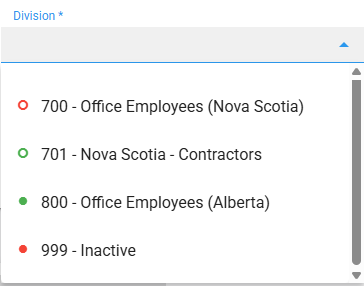
Self-Enrollment Invitation – Status Indicators
Visual indicators have been added when sending self-enrollment invitations to identify the status of divisions and classes.
Status indicators include:
Solid green: Active
Green outline: Future activation
Solid red: Terminated
Red outline: Future termination
These indicators help prevent configuration errors during the invitation process.
Technical Improvements
Although the following items do not have a direct impact on your day-to-day use, it is important for us to inform you about them. They reflect our commitment to maintaining a modern, high-performance, and secure platform.
Client Portal Modernization
We have carried out a major update to the technological architecture of the Client Portal.
This modernization enables:
A significant improvement in performance
Improved stability
Greater scalability for future features
The maintenance of the highest current technological standards
This modernization ensures the robustness, security, and long-term sustainability of the environment provided to you.
User Experience Harmonization
We have also implemented a visual harmonization between the Segic administrative platform interface and the Client Portal.
Objectives:
Increased consistency between environments
More intuitive navigation
A more uniform and professional user experience